Introduction
Scrum is a software development methodology that has its roots in the Agile Manifesto. This post is meant to be a short overview and potentially refresher about Scrum.
Other Agile Methodologies
Scrum is not the only agile methodology out there.
Project Start
How a project starts is out of the scope for Scrum. Usually a feasibility study will be performed where the expected benefits and costs will be considered.
Global Scrum Structure
Only the Sprint officially belongs to Scrum. The others are not required but often used.
- Product Vision: A short document that describes important aspects of the project and product to be made.
- Roadmap: This is the strategic plan. A visual planning that makes a larger time frame visible, usually broken into segments like quarters of a year.
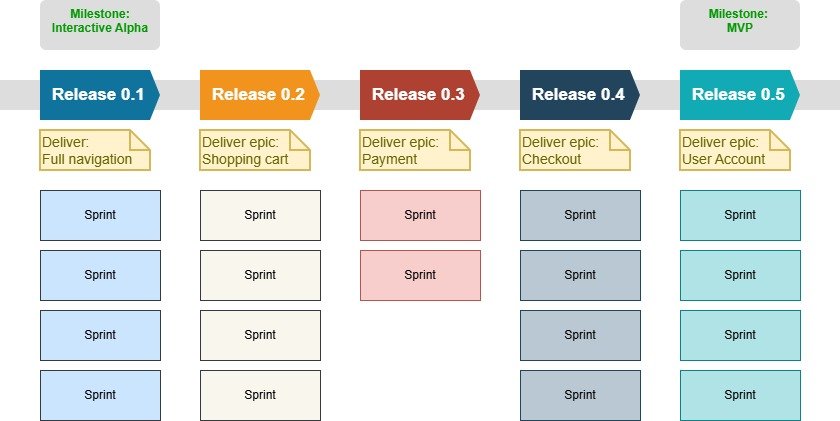
- Release planning: A chunk of roadmap that is planned. Usually sprints, milestones, epics and possibly user stories are made visible over time.
- Milestone: A specific event or achievement inside a release plan (or roadmap). It is made up out of several sprints usually.
- Sprint: A fixed time length (usually 1 to 4 weeks) in which backlog items are turned into usable and tested functionality.
Product Vision Statement
A short document with at least a description of the following topics.
- Who is the customer/buyer of the product?
- Which requirements do the end-users want?
- Which requirements do the end-users need?
- What are the goals of the project?
- Which elements of the project are crucial for the project to succeed?
- What makes our product stand out in comparison to competitors?
Product Backlog
If the product vision is clear and we know what we want to build, we can create the backlog. The backlog is an ordered list of user requirements, which are called Backlog Items. The order in the list is defined by logic and by what the priorities are. Priorities can be defined by carrying out a MoSCoW analysis.
The backlog will be adjusted over time. Items will be re-ordered, edited, split-up, maybe deleted. Usually this does not happen with items that are part of a sprint. Changes in a sprint can occur in specific circumstances, but only when the sprint goal is not compromised.
Backlog Item
The format for a backlog item is usually a User Story or a Use Case. The work each Backlog Item will cost to complete will be estimated using story points or hours. A clear base user story will be given a number of story points to act as baseline for the other user stories to estimate against. E.g. if a login page is given 5 story points, other Backlog Items can be compared to these 5 points and the work it represents.
An known (not mandatory) acronym for the definition the help write a backlog item is INVEST:
- Independent: Ideally a backlog item can be completed without a dependency on other backlog items.
- Negotiable: The description leaves room for conversation. The explicit (rigid) details of the implementation may not be provided.
- Valuable: What value the item brings to a stakeholder (or business).
- Estimable: In story point or hours.
- Small: Must fit inside the scope of a sprint.
- Testable: To check whether the implemented functionality (backlog item) meets the requirement. Can be an automated test.
Types of Backlog Items
- Feature: Piece of functionality that covers or is part of a user requirement.
- Bug: Functionality that does not work as intended.
- Task (Technical work): Piece of work that is usually a prerequisite of a feature. A task that is not necessarily a requirement on its own. (E.g. Setup a test environment)
- Spike: Prototyping a solution.
- Epic: A large body of work that usually does not fit in one sprint. It defines what business value you want to achieve. It is made out of multiple backlog items. It should fit inside a milestone.
Format Examples For Backlog Items
- User Story: As a <role> I want <functionality> because <requirement reason>
- Use Case: Template example:
| Use Case | Use Case Name. |
| ID | ID of Use Case. |
| Description | Brief description of what the use case achieves. |
| Actor | The user role that will interact with the system. |
| Pre-conditions | State or conditions the system is in before the use case starts. |
| Primary flow (happy path) | Common path through the system. Usually described with a numbered list. |
| Alternate flow # | Alternate path through the system. Should describe the condition of when this alternate path has become active. Can be more than one alternate flow. |
| Exceptions | Description of errors and how the system aborts and notifies the user. |
| Post-conditions | The state or conditions the system will be in after the use case. |
Acceptance Criteria
Usually in conjunction with a user story, the acceptance criteria determine on a per Backlog Item basis when it’s done. E.g. when creation a profile page, define which variables must be present and that the email address format is validated.
For complex logic, you can write acceptance criteria per scenario/path. E.g.:
User Story: As an online shopper, I want to reset my password so that I can regain access to my account.
- Scenario 1: Successful password reset request
- Given the user is on the “Forgot Password” page
- When they enter a valid registered email address and click “Send Link”
- Then the system sends a reset link to that email address within 30 seconds
- And displays a success message: “Check your inbox for reset instructions.”
- Scenario 2: Unregistered email address
- Given the user is on the “Forgot Password” page
- When they enter an email address not in the database and click “Send Link”
- Then display an error message: “No account associated with this email address.”
Definition Of Done
The Definition of Done determines is the formal checklist to determine whether a Backlog Item is really done. Overview of what should be defined:
Code & Development
- Code standards, architecture guidelines
- Code has been reviewed via a Pull Request (git)
Testing & Quality Assurance
- Unit tests are written for new functionality
- Integration tests pass in the staging environment
- Automated regression tests pass completely
- Edge cases and basic security checks have been verified
User Experience
- User Interface adheres to design and brand guidelines
- Responsive design verified against devices and browsers
- Basic accessibility standards
Documentation
- User documentation or release notes have been created/updated
- API endpoints are documented
- Code contains inline comments for complex logic or business rules
Deployment & Acceptance
- Successful deployment in staging area
- Acceptance Criteria that were defined in the User Story are met and accepted by Product Owner
- Non-functional requirements (response time, usability test) are met
Scrum Roles
Development Team (Developers)
Most common development team sub roles:
- Programmers
- Graphics designers
- Testers
- System Administrators
Scrum Master
Coach and protector. Ensures that team can work uninterrupted and smoothly. Clears technical, organizational or interpersonal obstacles that slow the developers down. Keeps scrum meetings focused, productive and within time limits. Communicates with the rest of the organization.
- Helps product owner.
- Communicates with rest of the organization, to prevent end-users to directly communicate with the development team.
- Facilitates meetings.
Product Owner
Responsible for the functionality of the product. Has knowledge of the business domain and understands the needs and requirements of the end-users who will work with the product. Has knowledge of markets and competitors. If the development of the product is for an external customer, it will maintain contact with the customer. Is responsible for the success of the product.
- Keep focusing on product vision.
- Maintain product backlog.
- Maintain delivery planning.
Stakeholders
Users, investors, customers, managers, anyone who is involved with the project and/or end product. Each stakeholder has different expectations, requirements and influence on the project.
Sprint
A sprint is a set of Backlog Items that are to be processed to “Done” items.
Before a sprint starts, a Sprint-meeting determines which Backlog Items should be processed for the next sprint. The whole team should be present to help estimate the time needed for each item to complete.
Sprints are the building blocks that are actually defined in the official Scrum Guide. The goal for the sprint should be defined. A sprint should have a fixed span of time, usually 1 – 4 weeks. The user story points/hours that can be completed during a sprint defines the velocity of the team. Usually, the velocity is determined empirically over time.
- Sprint Review Meeting: A meeting to present the demo of the project/product so far and to discuss it.
- Sprint Evaluation (Retrospective): Evaluate the strengths and weaknesses of the sprint.
Project Planning
So far, we’ve discussed core Scrum elements. In the next section several elements will be put in a broader context to help manage it.
General Planning Overview
This is a rough example, an approach of planning a project.
- Create Product Vision: See chapter about Product Vision Statement.
- Define Minimum Viable Product (MVP): Define what are the minimum features that satisfy core business and user requirements.
- Create Product Backlog: The list with Backlog Items. See chapter: Backlog Item. Create the backlog that will fulfill the MVP.
- Prioritize Backlog: MoSCoW analysis can help. If an item is dependent on another item, they should be planned after each other.
- Define Definition of Done: Test coverage, user manual, integration test, acceptation test, etc. A checklist with conditions that each Backlog Item must meet before it is done.
- Estimate story points for each Backlog Item: In story points, or hours.
- Create Roadmap & Milestones: The first Milestone is the MVP. Now you can set a number of milestones before and maybe after the MVP. Each milestone should determine what should be working in that milestone. In smaller projects, maybe one milestone halfway the MVP should be enough at first.
- Create Release Planning: An abstract planning for releases. Usually, a release consists out of multiple sprints. A release could be a completed set of features. Releases are in between the milestones and each milestone itself can be considered a release as well. Each release delivers functionality to the users of the software.
- Determine Sprint length: 1-4 weeks. Best is to choose a number of weeks and stick with it for consistency and to get better estimates of work that can be done in a Sprint.
- Create Sprint Planning: The Development team fills the sprint with Backlog Items during a meeting. Before this takes place, the Product Owner has prioritized the list. The goal of the sprint should be defined as well. An Increment is known as the Done output of a single sprint. If the team velocity is known, the story points can be divided over the velocity.
Agility
In between sprints, releases and milestones, the project can be directed to newly defined goals. The Backlog Items can be adjusted in content and/or priority.
Roadmap Example (Development)
The full roadmap of the project would include prerequisite steps as well. This roadmap begins at the start of development.